
Frontend naming, custom states, and group variables
Naming conventions
Throughout your app, it is essential that at a glance, you can tell what you are looking at, and what type of data you are dealing with. If you’re familiar with TypeScript, this is the kind of feature you get in an IDE - it is easy to know whether you’re dealing with a text, a number, an object, or else.
It is important to accomplish the same in Bubble.
Elements
Sometimes, no naming convention is simplest.
Now, it may sound absurd opening a build guide with such a statement. However, I will explain the rationale behind it.
Bubble has, implicitly, instilled a universal naming convention upon us for front-end elements. You know this when you place an element on a page. It will default to Text X, Group Y or Button Z, for example.
I do not see any value whatsoever in naming every element. There’s value for you as a developer if you’re paid hourly, but it does not deliver value to you as a developer, other developers that might work on the project, or your client. There might be a claim that it helps with readability, but I think that’s very limited, and if you do modify element prefixes for readability, you likely don’t do that for every element (and therefore aren’t disagreeing with my core argument that we do not need to rename everything).
Examples of naming conventions for every element which hold little semantic or other value include:
Prefixing all groups with GR_\[group name\]
Adding emojis into names
Removing the element type entirely
Now, there are a few reasons why:
Most groups are functionally irrelevant and serve no ends other than being a way to structure the UI
Using a specific, complex naming convention makes it harder for a developer unfamiliar with your project to begin working on it
It can make search more difficult, as when most developers are used to searching for “Button \[x\]”, if you’ve renamed all buttons to BTN - \[x\], it takes away that muscle memory.
Now, there are some things which I think should be named.
As a rule of thumb, if the element has a workflow or some relevant logic, it should be named so that it is clear what it does. That means that, for example, almost all Buttons should be named e.g ‘Button Create Account’ or ‘Button Make Payment’.
Additionally, key UI elements/groups should be named usefully. For example, you may name the header ‘Group header’ or a card ‘Group user card’. However, it generally makes sense to keep the prefix (the element type) as-is, so that other developers know what they’re looking at.
Custom states and group variables
Against custom states
We do not recommend using custom states at all. There are a few reasons for this:
They are functionally inferior to group variables, as they cannot be set dynamically in an elegant way
They are not as visible as group variables in the editor
In almost all cases, anything a custom state can do, a hidden variable can do better. One notable exception is passing data between reusables.
In defence of group variables
A group variable refers to making a group or repeating group have a data source. That is not to display anything, but is to store a dynamic variable that you can later reference. For example, if you reference an ‘Invoice’ in multiple places on the page, it makes sense that all references to said invoice use the group variable.
We recommend naming group variables as var - [name]. This makes them easily searchable and distinct in your scan flow. It doesn’t necessarily have to be var exactly - VAR might look cleaner to you, and that’s okay. It should, however, be short end easily searchable. var is convenient to type with one hand on the keyboard.
Group variables are highly visible and can be dynamically set
Group variables can be placed globally (e.g. in a hidden floating group), or locally (next to where they are used)
Storing hidden variables in a popup or floating group is functionally identical with the caveat that plugin elements generally do not load in a popup, so it would be advantageous to use a floating group. That said, I’m normally in the habit of using a popup which is fine for most use cases, so you do you.
Let’s unpack what I mean by placing a group variable globally or locally.
Suppose we have an invoice page, where we display the invoice’s line items, and also some customer details. The customer details are collapsed by default.
In a popup, we would have a hidden variable var - Invoice. This references the invoice we’re displaying, and would often come from a reusable element data source or property. Also in the popup, we would have var - Line Items which is a repeating group that stores the line items to display. The search constraint would be Do a search for Line Items where Invoice = var - Invoice’s Invoice.
These are global variables that dictate the entirety of what the user sees, hence they’re positioned in a hidden popup where they can all be viewed and managed together.
Now, let’s consider the case where we want to monitor the expanded state of the customer details. I may have a hidden variable right next to the customer details card, called var - customer details expanded. Why? Locating the hidden variable geographically close to where it is used/updated can assist understanding its functionality. You can judge which location for the particular hidden variable is right for you.
Naming pages and reusable elements
I do not have any particular system that I think is best for naming pages and reusable elements. As long as they’re named consistently, it is likely valid.
Take this page manager screenshot from NQU Secure:
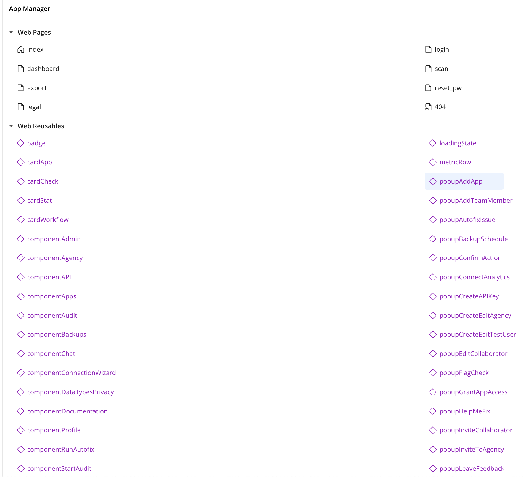
You will observe a view things:
All popups are prefixed with
popup. This makes it easy to find any popup. Additionally, all popups in this app are reusable elements. I think every app should use this practice. More on that later.Specific UI components like cards are named as such e.g
cardCheck,cardAppNon-specific components like
componentAdminandcomponentAppswhich show the admin panel and the user’s apps respectively, are prefixed with component, for lack of better options. I do not currently have a better approach to recommend here but will update the guide if I find one.